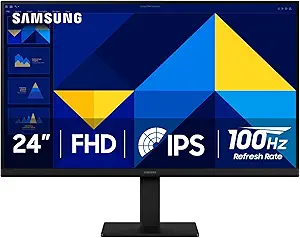
SAMSUNG 24″ (S30GD) Essential Monitor with IPS Panel and Tilt Only Stand, 100Hz Refresh Rate, Ergonomic Design, Advanced Eye Care, Game Mode, LS24D304GANXZA
Posted on by xasankaafi hussein
about this item
Key Specifications & Features
According to multiple sources:
- 24″ display, 16:9 aspect ratio. Samsung+2B&H Photo Video+2
- Panel type: IPS (wide viewing angles). Samsung+1
- Resolution: Full HD (1920 × 1080). B&H Photo Video+1
- Refresh rate: Up to 100 Hz. Samsung+1
- Response time: 5 ms (GtG). atnetworks.com+1
- Brightness: ~250 cd/m². compsource.com
- Contrast ratio: ~1000:1 typical. Samsung+1
- Viewing angles: 178°/178°. atnetworks.com+1
- Connectivity: HDMI 1.4 + VGA/D-Sub. B&H Photo Video+1
- Ergonomics: Stand supports tilt only (no height adjustment, swivel or pivot) and VESA mount (100×100 mm) is supported. B&H Photo Video+1
- Eye-care features: “Eye Saver Mode”, Flicker Free, Blue Light Reduction. tech-america.com+1
- Game Mode: There is a “Game Mode” to adjust contrast and colour for better visibility in games. Samsung Images+1
What’s Good
- The IPS panel gives better colour consistency and viewing angles compared to cheaper TN panels.
- The 100 Hz refresh rate is a nice upgrade over standard 60 Hz monitors — useful for smoother motion (games, video, general UI).
- Good set of features for the price: eye-care modes, slim bezel design, decent connectivity.
- VESA mount support means you could upgrade the stand later if you want more ergonomic adjustability.
Things to Consider / Limitations
- Resolution is only 1080p on a 24″ screen. If you’re very close to the screen or doing detailed work (photo editing etc) you might prefer a higher resolution (1440p or 4K) for sharper text/images.
- Stand is tilt only — no height adjustment, no swivel/pivot. If ergonomics are important (adjusting to eye level, dual monitor setup) you might need to get a separate arm or monitor stand.
- Connectivity is basic: one HDMI + VGA. No DisplayPort, no USB-C, etc. If you need those you might need a different model.
- Brightness (~250 cd/m²) is modest — in very bright rooms or near windows you might wish it were brighter.
- The colour gamut (72% NTSC approx) is okay for general use but not ideal for professional colour-work (e.g., print design, high-end photo editing).
Is It a Good Fit for You?
If I look at what you listed (“IPS Panel and Tilt Only Stand, 100Hz Refresh Rate, Ergonomic Design, Advanced Eye Care, Game Mode”) — yes, this monitor matches that description quite well. So if your use case is something like:
- General productivity (web browsing, office work) with good colours & angles
- Casual gaming or wanting smoother motion (100 Hz)
- A good value monitor in the mid-budget range
- You’re okay with a basic stand (tilt only) or plan to use a separate monitor arm
… then this model seems like a solid choice.
If instead you have more demanding needs (e.g., height adjustable stand, USB-C, high resolution, or professional colour accuracy) then you may want to look at more premium monitors.